up Smart Auto-Disconnect Type-C Charging Guard – 140W Anti-Overcharge Adapter for Safe Overnight Charging
up Smart Auto-Disconnect Type-C Charging Guard – 140W Anti-Overcharge Adapter for Safe Overnight Charging
Couldn't load pickup availability

up Smart Auto-Disconnect Type-C Charging Guard – 140W Anti-Overcharge Adapter for Safe Overnight Charging
✨ FEATURES
🔋 SMART AUTO POWER-OFF PROTECTION - Helps reduce overnight trickle charging by automatically disconnecting power when your device reaches a fully charged or near-full state. A smarter way to protect your daily charging routine.

🛡️ PHYSICAL POWER BREAK - Unlike software reminders or manual unplugging, this charging separator creates a real physical disconnect after charging is complete, helping reduce unnecessary current flow, heat buildup, and long charging exposure.

🌙 BETTER OVERNIGHT CHARGING HABITS - Ideal for bedside charging, office desks, travel, and everyday use. Charge your phone before sleep and let the adapter automatically disconnect power when charging is complete.

⚡ DUAL MODE CURRENT IDENTIFICATION - Switch between white mode and blue mode with one press. White mode is suitable for screen-based devices such as phones, tablets, and laptops. Blue mode is designed for non-screen electronics such as power banks, shavers, beauty tools, Bluetooth devices, and more.

🚀 UP TO 140W FAST CHARGING SUPPORT - Built for modern high-power devices, this compact adapter supports up to 140W fast charging when used with compatible chargers, cables, and devices.

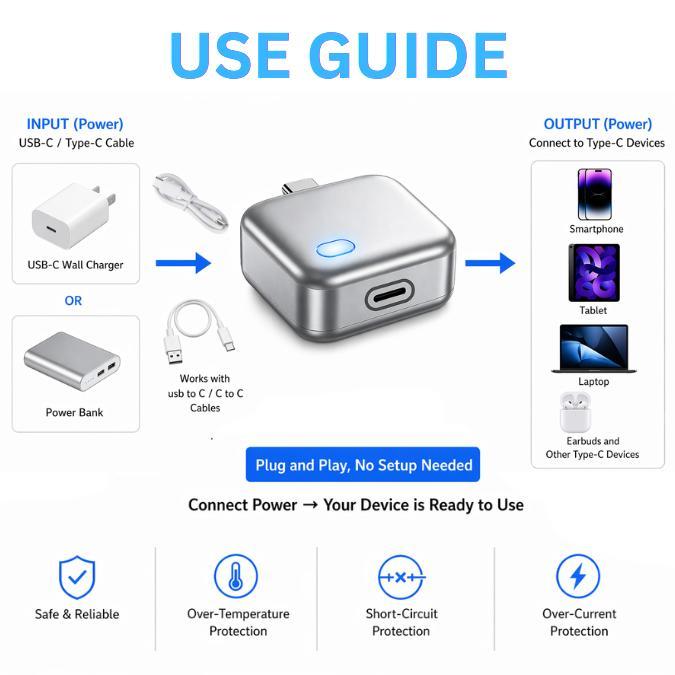
🔌 PLUG-AND-PLAY DESIGN - No app, no setup, and no complicated controls. Simply connect it between your charging cable and device, choose the proper mode, and charge as usual.

📝 HOW TO USE (4 EASY STEPS)
STEP 1: Connect the adapter between your charging cable and your device.
STEP 2: Press the button once to select the correct mode. Use white mode for screen-based devices and blue mode for non-screen electronics.
STEP 3: Start charging normally. The adapter will monitor current and voltage during the charging process.
STEP 4: When the device is fully charged or nearly fully charged, the adapter automatically disconnects power.

🧪 FUNCTION TEST
During normal charging, press and hold the button for 5 seconds until the white and blue lights blink alternately. The adapter should disconnect power after about 5 seconds. This can be used to check whether the automatic disconnect function is working properly.

📊 SPECIFICATIONS
Type-C DC: 5V–28V, 0A–5A
Lightning DC: 5V–28V, 0A–5A
Maximum Power Support: Up to 140W
Material: Fire-Resistant Plastic
Size: 4.2 × 3.3 × 2 cm
Weight: 25.5 g
Mode Control: One-Press Mode Switch
Package Includes: 1 * Smart Auto Power-Off Charging Separator
⚠️ NOTES
For screen-based devices such as phones, tablets, and laptops, the displayed 100% battery level may not mean the battery is completely full. The adapter may continue monitoring for about 10–50 minutes before disconnecting power.
For non-screen electronics such as power banks, shavers, Bluetooth headphones, beauty tools, and children’s electronic toys, use blue mode for more suitable automatic power-off detection.
Lightning output supports one mode only.
Charging time and automatic disconnect timing may vary depending on device model, battery condition, charger output, and cable quality.
Do not use with damaged cables, damaged chargers, wet devices, or unstable power sources.
This product helps improve charging habits but does not replace certified chargers, quality cables, or proper device care.